
Texas Hunt & Fish
Texas Parks and Wildlife DepartmentSports
2.9110.00 Reviews
- Version
- 4.1.2
- Installs
- 100.00K
- Age Rating
- Everyone
Screenshots
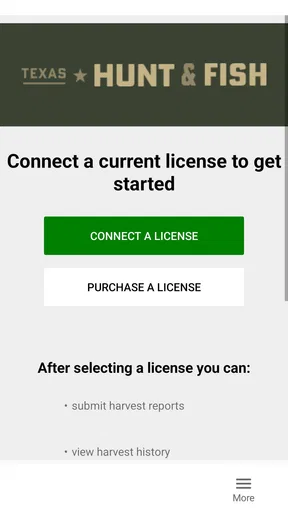
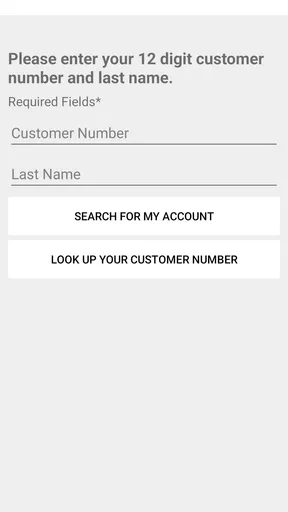
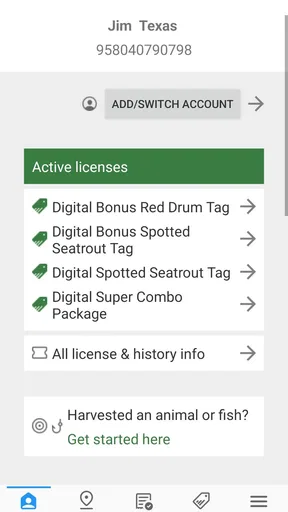
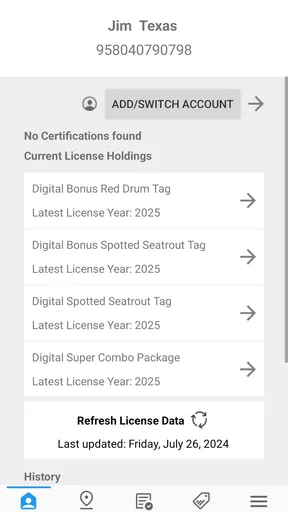
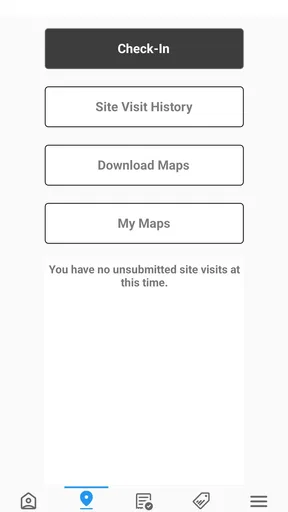
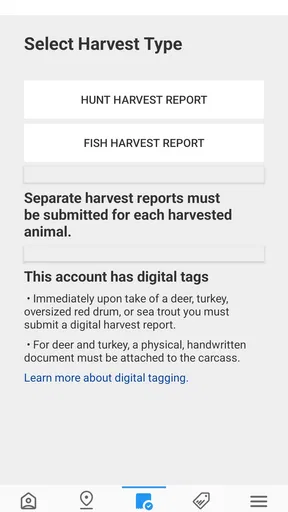
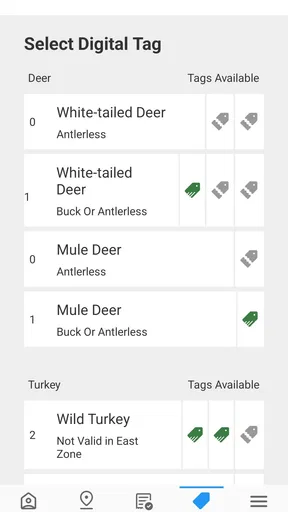
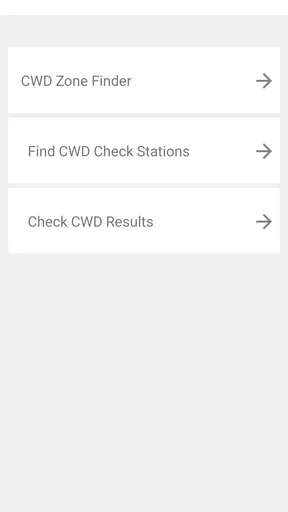
Our Review of Texas Hunt & Fish
 Analysis by Appyee
Reporting harvested game from the field is one of those jobs that sounds simple until the moment you need to do it with cold hands, limited signal, and a phone that has been riding in a pocket all morning. Texas Hunt & Fish is built for that specific situation: it is a free sports app from the Texas Parks and Wildlife Department that lets hunters report harvested game in real time. I found its purpose refreshingly narrow, but that focus also means the experience depends heavily on preparation and on the condition of your phone and connection.
This is not an all-purpose hunting companion, a social network, or a replacement for learning Texas regulations. Its value is concentrated in one important task: getting a harvest report submitted while the information is fresh. If you hunt in Texas and need a direct way to handle that responsibility from a mobile device, it deserves a place on your phone. If you want maps, extensive trip planning, equipment logs, or a broad fishing toolkit, you may find it too limited.
Where the real friction appears in the field
The first difficulty is usually not understanding the app. It is opening and using it at the right moment. In a vehicle, at home, or on a stable connection, the process feels much more manageable. In the field, the same action can be interrupted by weak reception, a low battery, a locked screen, gloves, or the simple distraction of handling equipment safely. My main advice is to treat the app as part of your pre-hunt routine rather than something you discover only after a harvest.
That distinction matters because real-time reporting is time-sensitive by nature. Waiting until you return home can create unnecessary stress, especially if you are unsure whether the report went through. I would rather open the app before leaving, confirm that it starts properly, and know where the reporting action is than troubleshoot while standing outdoors.
Another point that can catch people off guard is the difference between entering information and successfully completing a report. A screen may appear responsive while a request is still waiting for a connection. A button press is not the same as a confirmed submission. I recommend pausing after each important step and looking for a clear completion state before closing the app or putting the phone away.
Because the application comes from the Texas Parks and Wildlife Department, it has a public-service feel rather than the polished, feature-heavy design of a commercial hunting platform. That is not automatically a weakness. The focused design can make the purpose easier to understand, but it also means you should not expect the surrounding conveniences found in larger outdoor apps.
The current version is 4.1.2, and it runs on Android from version 8.0 onward. Those details make it accessible to many older devices, but compatibility alone does not guarantee a smooth field experience. Older phones may have slower startup, less reliable battery life, or aggressive background restrictions. If your phone is several years old, test it before your trip instead of assuming that installation means readiness.
What to check before leaving
My preferred setup is deliberately boring. I install the app while connected to a dependable network, open it once, and move through the available screens without rushing. I also make sure the phone has enough charge for the entire outing, not just enough to start the day. A reporting tool is most useful when it remains available after navigation, photographs, calls, and cold-weather battery drain have taken their share.
Keep the device somewhere that is easy to reach without exposing it to avoidable damage. A sealed pocket or protective case is more practical than leaving it loose with keys or equipment. If the weather is wet, a screen that is difficult to operate can turn a short report into a frustrating one. These are not special app features; they are simple conditions that determine whether a mobile reporting workflow works when it matters.
I would also avoid making the first test immediately before a hunt. Give yourself enough time to notice whether the app opens normally, whether the phone has space for it, and whether the device is running an operating-system version it supports. The app is free and carries an Everyone content rating, so there is no purchase decision or age restriction complicating setup, but basic device readiness still matters.
One useful habit is to decide in advance where you will keep the information needed for reporting. You may need to refer to details about the harvest, and searching through unrelated notes or photographs at the same time adds needless delay. I like keeping relevant information organized before heading out, while still handling the report carefully and checking each entry rather than tapping through automatically.
Do not confuse preparation with trying to complete a report prematurely. A setup check means confirming access and understanding the flow; it does not mean entering inaccurate information just to see whether every step accepts a value. If you are unsure about a regulatory requirement, consult the appropriate Texas hunting guidance rather than guessing inside the app.
How I would recover from an interrupted report
If the app stops responding, I start with the least dramatic explanation: the connection may be weak. I move to a safer location with better reception if that is possible, wait briefly, and try again. I do not repeatedly press the same control while the screen appears to be processing, because duplicate attempts can create confusion about what actually happened.
If the screen is frozen, I close and reopen the app once. Before doing that, I note what I had already entered so I can compare the next screen with my memory. Restarting blindly is not ideal when the report contains details you do not want to reconstruct under pressure. A quick written note, made safely and before the process begins, can be surprisingly useful as a backup for your own reference.
When the app opens but behaves strangely, I check whether the phone itself is overloaded. Closing other demanding applications, freeing a little storage, and restarting the device are sensible general steps. I would avoid deleting app data as a first response, since clearing local information can remove progress or force a fresh sign-in or setup step. That kind of reset should be reserved for situations where you understand the consequences.
Another practical recovery method is to separate the reporting task from everything else. Stop taking photographs, streaming media, or using navigation for a moment. Return to the reporting screen, use the strongest available connection, and give the process your full attention. This reduces both technical load and human error, which are often mixed together when a field report goes wrong.
If you are uncertain whether a submission completed, do not immediately create another report simply because you did not see the result quickly. First look for an in-app indication that the action succeeded, then check whether the app presents the same task as unfinished. If the status remains unclear, follow the official Texas Parks and Wildlife Department guidance for resolving reporting questions. The safest approach is to preserve your notes and avoid guessing.
This is one of the less obvious trade-offs of a focused government app: it may handle the central reporting purpose without giving you the broad recovery tools you would find in a larger commercial platform. That makes preparation more important. I see this as a reason to build a calm workflow, not as a reason to abandon the app.
When the problem is probably outside the app
It is easy to blame the application when the actual problem is coverage. Rural hunting areas can have inconsistent service, and a phone may show a signal indicator without having a dependable path for a transaction. If pages or other connected services are also slow, the app may simply be waiting for the same network that is affecting everything else.
Battery behavior can create a similar illusion. A phone that shuts down or dims aggressively may make the app appear unreliable, especially in cold conditions. Before judging the reporting workflow, test the device with a healthy charge and reduce unnecessary background activity. Carrying a power bank is sensible for a long outing, but it should not replace checking whether the phone can last through the day.
Permissions and phone settings can also interfere with normal use. If the operating system has restricted the app, disabled network access, or placed it in an unusually aggressive battery-saving mode, the result may look like an application failure. I would review the app’s settings in the phone before reinstalling anything. Since menus differ between Android devices, the useful principle is simply to check whether the phone is preventing normal operation.
Storage is another overlooked cause. A nearly full phone can behave unpredictably, and the issue may show up first in an app you use only occasionally. Keeping a reasonable amount of free space and installing system updates when convenient are sensible maintenance steps. I would not update everything minutes before leaving, though; changes made at the last minute are harder to evaluate if something behaves differently.
There is also a human factor. A rushed entry, a misunderstood field, or a tap made while wearing bulky gloves can produce an outcome that looks technical but is actually an input problem. Slow down, review what is displayed, and keep the phone steady. A focused reporting tool cannot correct information that was entered carelessly.
For a broader diagnosis, compare the app’s behavior with the rest of the phone. If unrelated applications connect normally but this one repeatedly fails, the app deserves closer attention. If the entire device is offline or unstable, changing apps is unlikely to solve the underlying issue. That distinction helps prevent wasted time and unnecessary reinstallations.
Where it fits among hunting and fishing apps
Compared with a general hunting app, Texas Hunt & Fish has a much narrower job. Commercial alternatives often emphasize maps, weather, scouting, journals, gear organization, or communities. Those tools can be valuable before and after a hunt, but they do not automatically make a state-specific harvest report easier. For that particular responsibility, a focused official app can be more appropriate than a crowded dashboard.
The trade-off is obvious once you know what you want. If your priority is planning a route, reviewing terrain, recording a season-long journal, or combining hunting with a wide range of fishing information, you will probably want another application alongside this one. I would not install it expecting a complete outdoor toolkit. I would install it because a direct reporting channel has a clear purpose.
The name includes both hunting and fishing, while the central store summary emphasizes real-time harvested-game reporting. That makes it especially relevant to Texas hunters who need the reporting function, but I would judge the app by the task it clearly performs rather than assume that its title means it replaces every fishing or wildlife-management resource. For detailed rules, seasons, and legal decisions, official regulations remain more important than any convenience app.
Its audience is also quite specific. A regular Texas hunter who wants a free official utility is the strongest match. A visitor who hunts only rarely may still appreciate it, but should spend more time preparing because unfamiliarity with the process increases the chance of hesitation. Someone who does not hunt in Texas has little reason to choose it over tools designed for their own location.
What the adoption numbers suggest, and what they do not
The app has passed 100K installs, which tells me it has reached a meaningful audience beyond a tiny pilot. Its average rating is 2.9 from around 212 ratings, with roughly 110 written reviews. I read that combination as a warning to keep expectations practical: the app is established enough to be useful, but the experience is not universally smooth.
A rating like that should not be treated as a final verdict without considering the context. Public-service apps are often opened during stressful, time-sensitive moments, and a connection failure can feel like an application failure. At the same time, a middling score is a good reason to test the workflow before relying on it. I would not wait until a remote location to discover whether my particular phone handles it well.
The free price removes one barrier, and the Everyone rating makes it straightforward to keep available on a shared family device. Still, free does not mean effortless. The cost may be zero, but your time, battery, signal, and attention are part of the real setup. That is why my recommendation is conditional rather than enthusiastic in every situation.
Who should use it and who should skip it
I would recommend Texas Hunt & Fish to Texas hunters who want a simple official route for reporting harvested game and are willing to perform a short pre-trip check. It is also a sensible companion for people who already use a separate mapping or weather app and only need this application for the state reporting task. Keeping those jobs separate can actually make the phone less cluttered during a hunt.
I would be more cautious if you regularly hunt in places with unreliable service and have no backup way to preserve the relevant details. That does not make the app useless, but it means your workflow needs a fallback plan and a clear understanding of official requirements. I would also skip it as a primary outdoor app if your main goal is navigation, scouting, social sharing, or detailed catch-and-trip organization.
For a realistic example, imagine finishing a hunt near the end of a long day. I would secure my equipment first, move somewhere safe to use the phone, open the app, enter the harvest details deliberately, and wait for a clear indication that the report is complete. If the connection failed, I would record the necessary information, avoid repeated uncertain submissions, and resolve the issue through the appropriate official channel rather than improvising.
My practical verdict
After looking at the app as a field utility rather than as a full outdoor platform, I think its strengths are its clear purpose, free access, official developer, and suitability for real-time harvest reporting in Texas. Its weaknesses are the friction that appears when connectivity, battery, device performance, or user attention are poor. Those limitations are important, but they are manageable when the app is tested before the hunt.
The best way to use it is to make it one small part of a larger routine: install it early, open it before leaving, keep the phone charged, know where your relevant information is, and verify completion instead of assuming it. That approach also answers the most important practical question—whether you can rely on it in your circumstances—without confusing the app with the network or the phone supporting it.
My bottom line is simple: use this as a focused Texas harvest-reporting tool, not as a complete hunting suite. For the right user, that narrow role is enough to justify keeping it installed. For everyone else, especially hunters seeking maps and planning features, a broader outdoor app will be a better main companion, with this one reserved for its specific official purpose.
Verdict
Strengths of Texas Hunt & Fish
- Detailed maps help plan hunting and fishing trips.
- Includes useful information on seasons, regulations, and licenses.
- Supports outdoor planning for both hunters and anglers.
- Can help users discover nearby public hunting and fishing areas.
- Practical reference to keep on hand during remote outdoor trips.
Limitations of Texas Hunt & Fish
- Coverage and accuracy may vary by state or local area.
- Some features may require an internet connection or location access.
- Regulations can change, so official sources should still be checked.
- Outdoor maps may be less useful in areas with weak GPS signals.
- The interface may feel information-heavy for occasional users.
Other Releases by Texas Parks and Wildlife Department
View All
Texas Outdoor Annual
Sports4.4
Similar Picks in This Category
View All
BeSoccer: Soccer Live Score
BeSoccer apps4.3

Cricbuzz - Live Cricket Scores
Cricbuzz.com3.7

NFL
NFL Enterprises LLC2.4

Da Fit
MO YOUNG LIMITED3.6

ESPN
Disney4.5

LiveScore: Live Sports Scores
LiveScore Limited4.5
Frequently Asked Questions
What is Texas Hunt & Fish?
Texas Hunt & Fish is a mobile app designed to help outdoor enthusiasts access information and services related to hunting and fishing in Texas. It can provide useful resources such as regulations, licensing details, seasons, permits, public hunting opportunities, and location-based information. Before relying on the app in the field, users should confirm that the information is current and follow official Texas Parks and Wildlife requirements.
Can I purchase or display Texas hunting and fishing licenses through the app?
The app may support access to license-related services, including information about available licenses, permits, and required documentation. Depending on the current version and your account setup, some transactions or digital license features may be available directly in the app, while others may redirect you to an official service. Always verify that your license is valid and carry any legally required identification or documentation.
Does Texas Hunt & Fish work without an internet connection?
Some content may remain available after it has been loaded, but full functionality can depend on an active internet connection. License services, updates, maps, account features, and current regulations may require mobile data or Wi-Fi. Because hunting and fishing areas can have limited coverage, it is sensible to review important information in advance, save anything the app allows you to access offline, and avoid depending on the app as your only source of navigation or legal guidance.
Is Texas Hunt & Fish useful for finding hunting and fishing locations?
The app can be useful for exploring information about Texas hunting and fishing opportunities, including public areas, regulations, access details, and location-based resources. However, the exact features may vary by region and app version. Users should check property boundaries, seasonal restrictions, access rules, and local requirements before visiting a location. Maps and app information should supplement, rather than replace, official signs and current Texas Parks and Wildlife guidance.
Is Texas Hunt & Fish free to download and safe to use?
Texas Hunt & Fish may be available as a free download, although certain licenses, permits, reservations, or related services can involve separate fees. As with any official outdoor-services app, users should download it from a trusted Google Play or Apple App Store listing and review the developer information before installing. The app may request permissions such as location access, notifications, or account information, so check these settings and the privacy policy before continuing.
